
Browse and search documentation
Process diagnosis and AI assistance
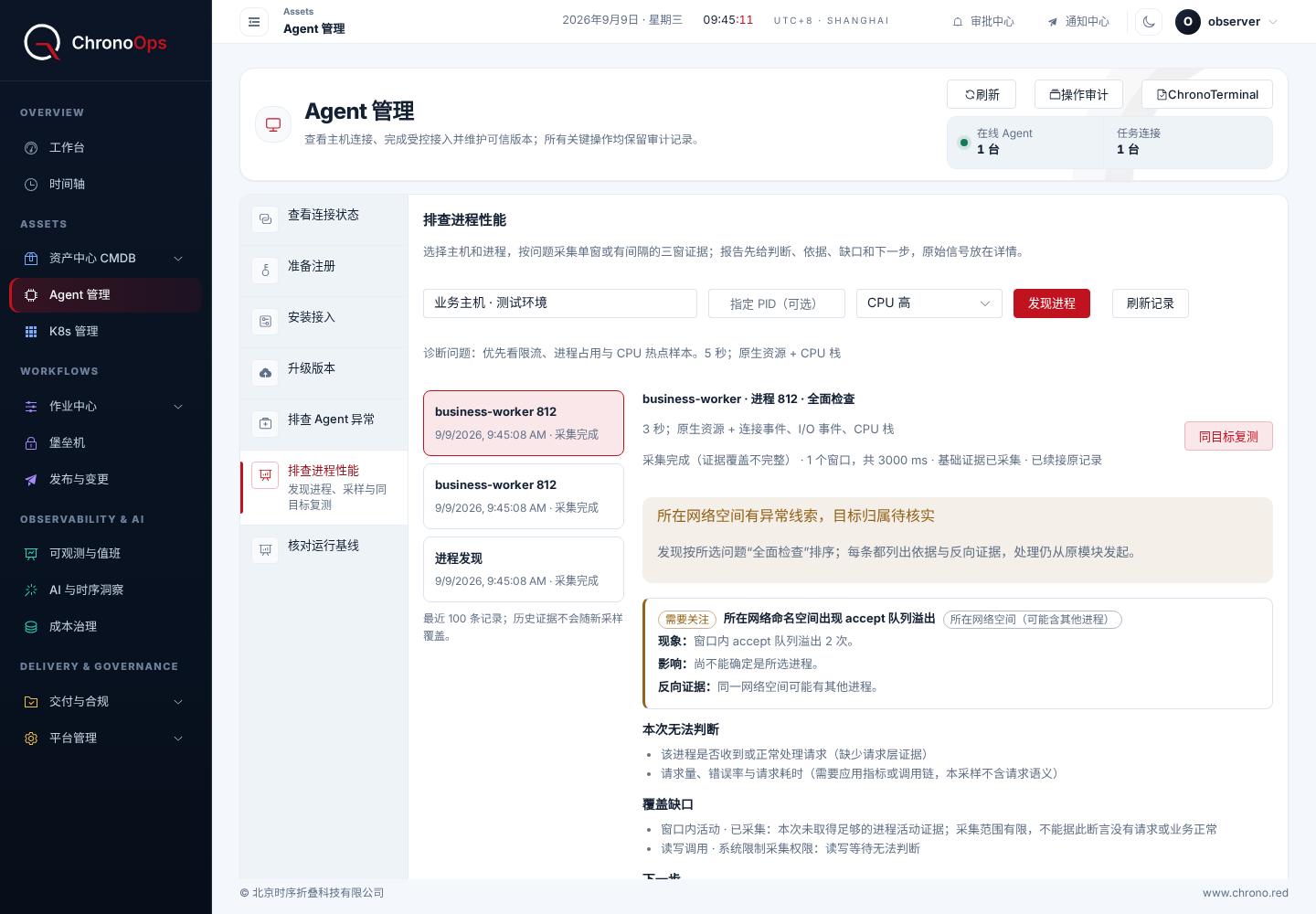
Sample a process for slow responses, high CPU or memory growth, review evidence and unknowns, then decide what to do next.
On this page
Agent versus process diagnosis
Agent troubleshooting examines the Agent’s own runtime, service and connections. Business-process diagnosis targets a specific process on a selected host and requires process-specific access. Basic Agent diagnosis permission does not automatically grant business-process access.
Sampling coverage depends on OS, Agent version and available collectors. Unsupported signals and missing samples are identified separately; Linux results do not establish equivalent coverage on Windows or other platforms.
Investigate a process
- Select the host, confirm its project and Agent status, then find the target process and verify identity and start time.
- Select the issue, such as slow response, connection failure, high CPU, memory growth or abnormal exit. Do not substitute another process merely because the names match.
- Confirm available sampling options and the time window, then run a bounded sample. Reselect if the process exits or its identity changes.
- Review the provided system, container, connection and runtime evidence alongside unavailable signals and sampling limits.
- Keep the issue and sampling plan consistent for retests. Check times and targets before comparing results rather than treating unlike measurements as a trend.
Avoid misreading results
| Result | Interpretation |
|---|---|
| Zero samples | No event may have been captured; it does not establish normal behavior |
| Unsupported or unavailable | The signal is not covered and must not be substituted with zero |
| Events in the same time window | A clue for investigation, not proof of causality by itself |
| Healthy short sample | Describes that window, not long-term monitoring |
Review AI-assisted analysis
AI can analyze available metrics, logs, resources and changes and propose responses. Check whether the connection is absent, in demo mode or configured. A successful connectivity probe does not guarantee analysis quality.
Review evidence, unconfirmed causes and the recommendation’s scope. For execution, verify target, risk and access and follow confirmation or approval rules. A generated recommendation does not modify production automatically.
Verify after an action
First verify that the action completed, then observe the same signals or checks on the same target. Preserve before/after times, conditions and results. If evidence is insufficient, keep the conclusion pending and continue investigating instead of equating command success or an AI recommendation with repair.
Send your deployment version, page and a redacted description so we can investigate and update the guide.
weiwendi@aiops.red