
Browse and search documentation
Inspection reports and follow-up
Read checks and measurements, assign findings, track progress and confirm recovery through reinspection.
On this page
Choose checks
Choose a fixed template available in your version and review paths, service names, ports and thresholds. Fixed templates accept defined value types, not shell expressions or arbitrary commands.
| Check area | What to verify |
|---|---|
| Filesystem | Space and inodes; confirm the intended filesystem |
| Service or process | The systemd unit or process short name matches the target environment |
| Port | Local TCP listening, not remote network reachability |
| Certificate | Local PEM expiry, not validation of a remote certificate chain |
| Time synchronization | systemd NTP synchronization state, not a measured clock offset |
Read an inspection report
- Check run time, targets and check version first. Do not interpret old-rule results using new thresholds.
- Read execution status separately from check status. A completed command can contain unhealthy, healthy and inconclusive checks.
- Open findings and compare measurements, thresholds and evidence. Resolve collection prerequisites if a tool is missing, a service is not loaded or data is unavailable.
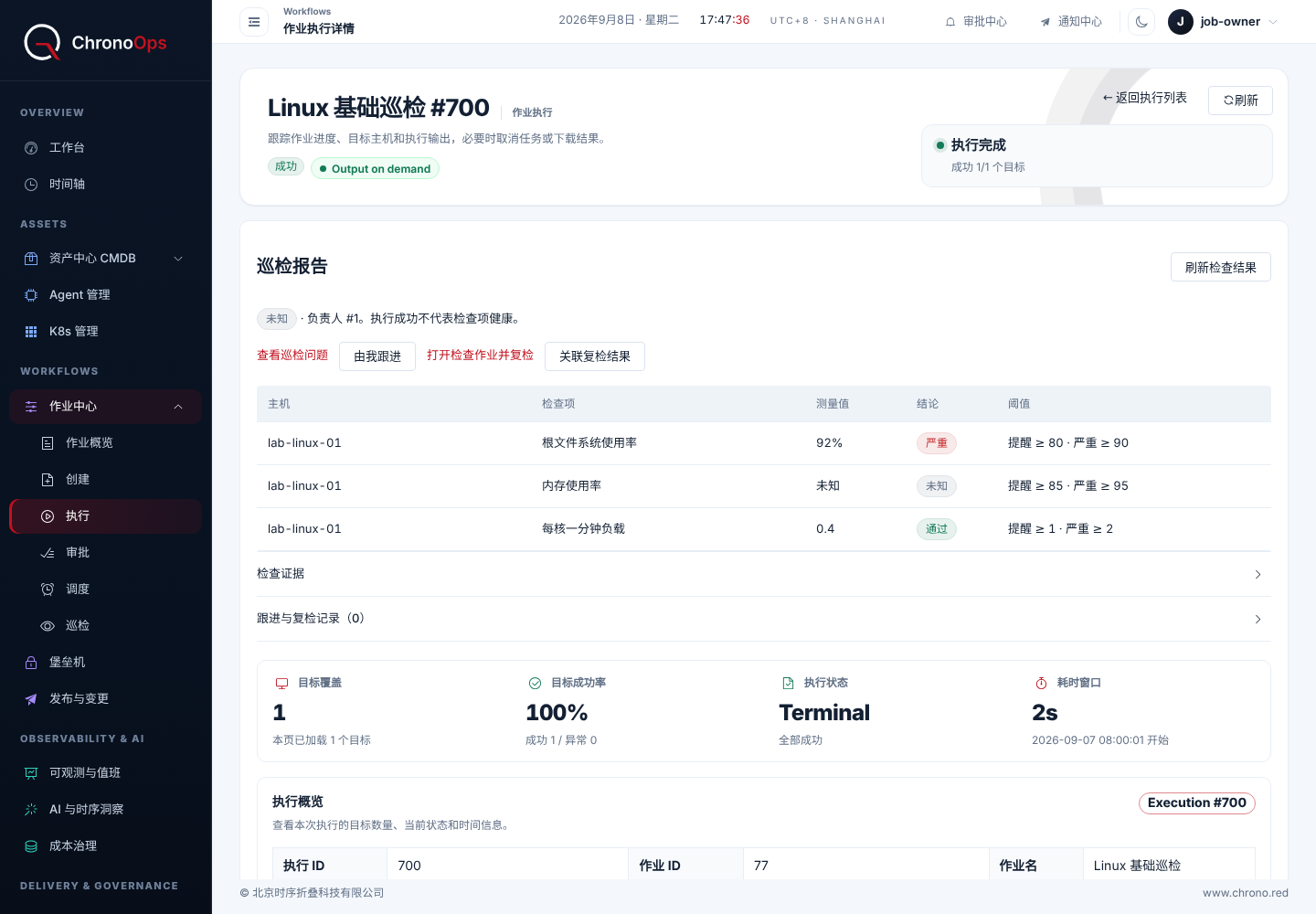
Assign and track findings
- Open the finding and confirm its host, check and current occurrence.
- An authorized user claims it or assigns an eligible project member, then records investigation progress and the next step.
- If remediation is available, select a published script or template from the same project and verify the single target and parameters.
- Explicitly authorize the action and automatic reinspection of the original check after success. Existing permission, MFA and approval rules still apply.
When is a finding recovered
Continuing failure of the same check is tracked together instead of opening duplicates. Recovery requires a later healthy result for the same check and target configuration. Unknown results, read failures or successful remediation commands do not substitute for a healthy reinspection.
A recurrence after recovery retains prior history and records the new occurrence. Changing thresholds or targets must not automatically close findings from an old configuration. Review check versions, actions and reinspection records together.
Understand notifications
In-app notifications direct owners to findings they are authorized to read. A recorded notification does not mean it was read or delivered through email or another external channel. Check assignment and progress for important findings.
Send your deployment version, page and a redacted description so we can investigate and update the guide.
weiwendi@aiops.red